

- Status
- Verified
- Base model
- …
- Lineage
- …
- Unchanged from base
- …
- Trending
- #25
- Downloads, 30 days
- 80.5k
- Weights
- 114 GB
- Revision
Edge0 is not a relabelled Qwen3.8-Flash-Next, and not a re-quantization of it: we rebuilt the model's expert layer.
At a glance
- Task
- Text generation
- Input
- text
- Output
- text
- Parameters
- 4.9B
- Architecture
- Qwen4exp
- Context
- 256K tokens
- Format
- GGUF
- Library
- edge0
- License
- other
- Base model
- Quantized from Qwen/Qwen3.8-Flash-Next
- Released
- Nov 2026
- Updated
- Nov 2026
- Likes
- 557
- Downloads, all time
- 80,481
Family
Models built on Edge0-145B-NVFP4.
Run it
Pinned to the indexed revision.
llama-server -hf Edge0/Edge0-145B-NVFP4Through the hub: the same tools, each file from a source that is up (Hugging Face, ModelScope, IPFS), at this revision. The last line checks every file against the hash the tree names.
export HF_ENDPOINT=https://gethologram.ai
hf download Edge0/Edge0-145B-NVFP4 --quiet && hf cache verify Edge0/Edge0-145B-NVFP4
Spaces
Used in 1 Spaces.
Read the full model card

Edge0-145B · NVFP4


Quality · Speed · Architecture · Quick start
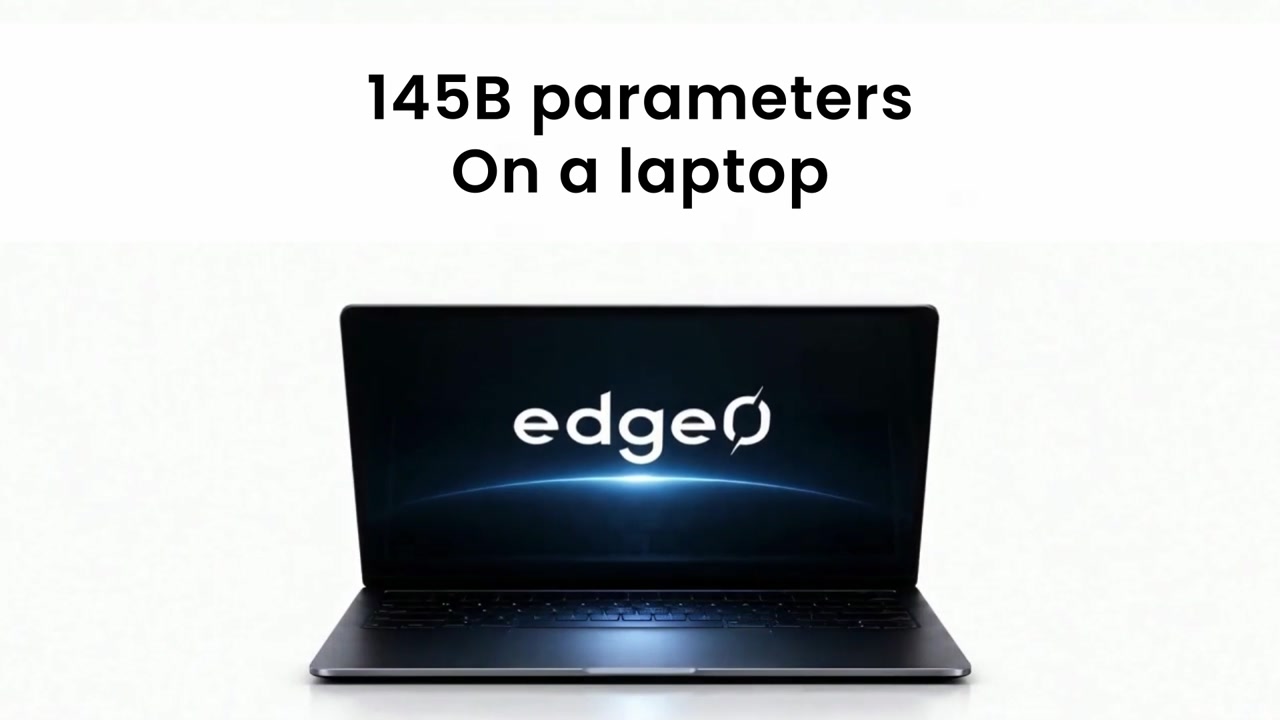
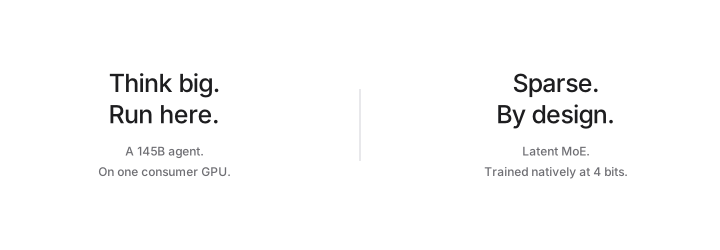
A 145B agent, running on one consumer GPU.
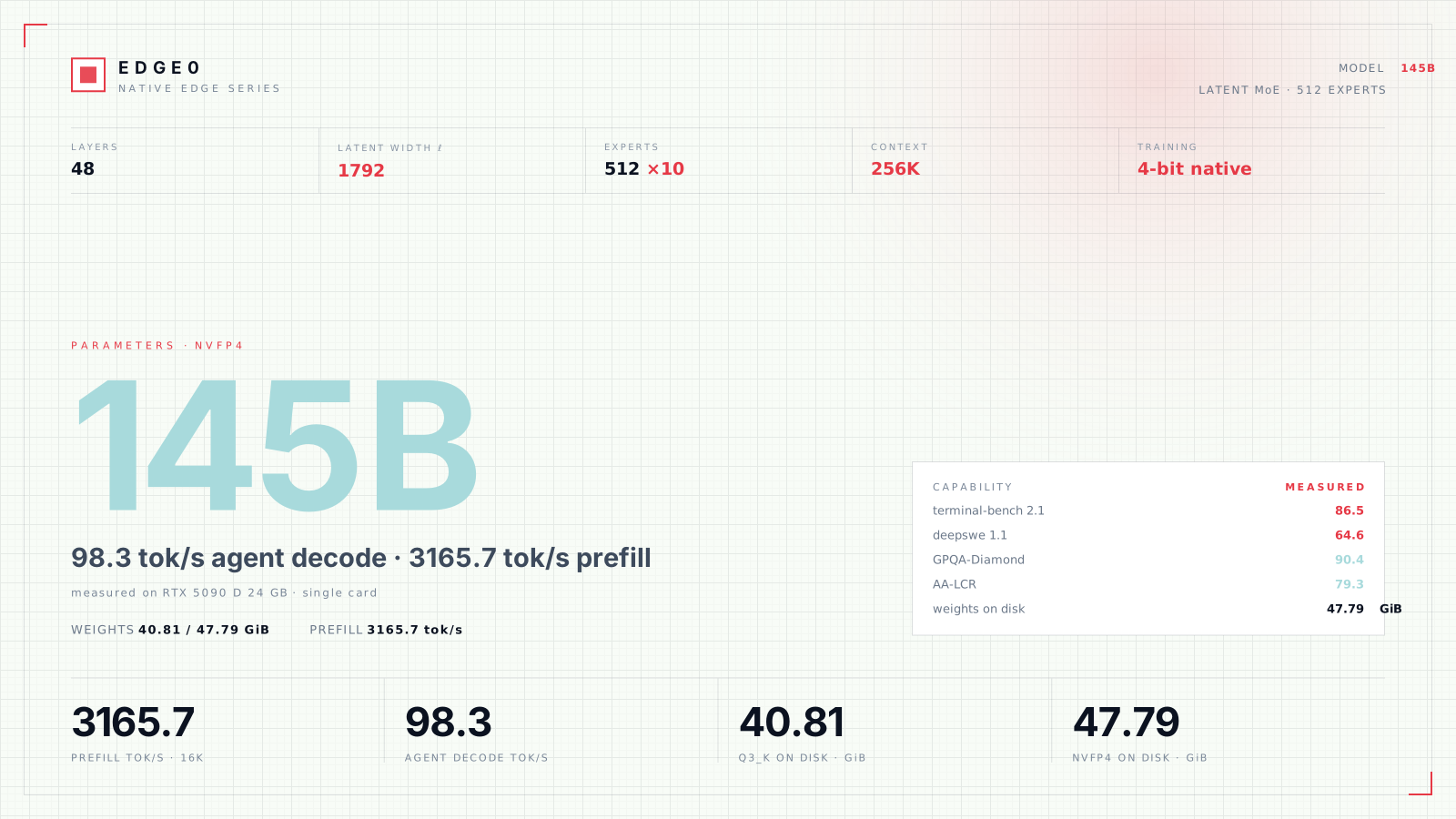
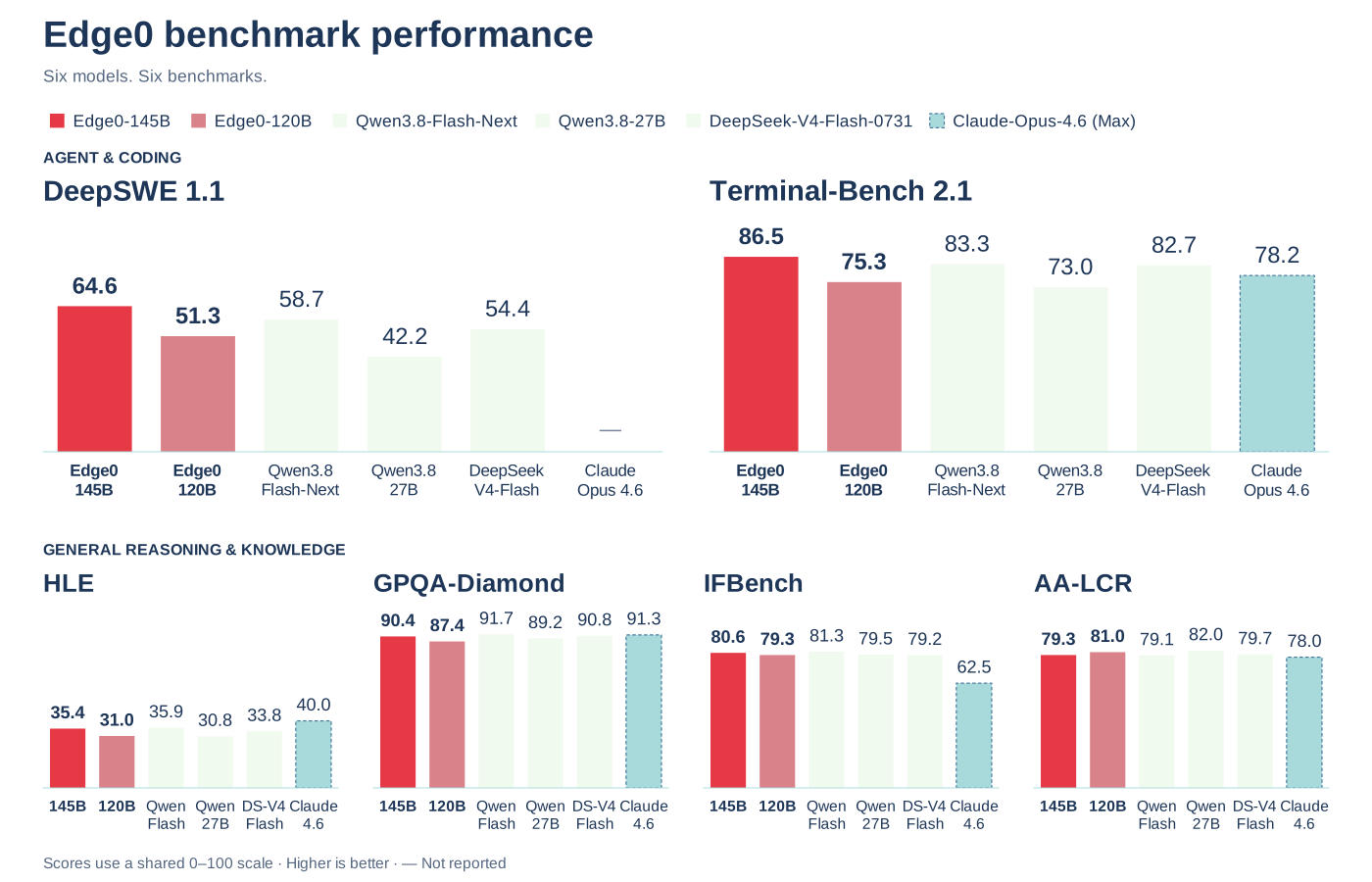
98.3 tok/s agent decode · 3165.7 tok/s 16K prefill · 86.5 terminal-bench 2.1.
Throughput measured on RTX 5090 D 24 GB · NVFP4.
A latent sparse MoE: 48 layers, 512 experts, 10 active per token, 256K context, trained natively at 4 bits.
This repository: Edge0-145B · NVFP4
ⓘ With residency enabled, 145B NVFP4 used 23.25 GiB VRAM + 38.27 GiB host RAM on RTX 5090 D 24 GB.
Model overview
NVFP4 · RTX 5090 D 24 GB. Prefill throughput uses a 16K-token input; weight sizes are listed separately for each format.

Quality
Higher is better. Results are listed by model.

Speed
Throughput is shown in tok/s, grouped by hardware and build. The summary above uses NVFP4 on RTX 5090 D 24 GB.
Full speed table · all reported machines and builds
Highlighted rows show the NVFP4 build in this repository.
Machine Build 4K prefill 16K prefill Chat decode Agent decode
RTX 5090 D 24 GB Q3_K 2169.9 3554.9 99.7 121.2
RTX 5090 D 24 GB NVFP4 1839.6 3165.7 79.6 98.3
RTX 4090 24 GB Q3_K 2042.0 3179.4 69.9 91.7
RTX Spark N1X 60 GiB Q3_K 674.0 770.3 37.7 36.7
RTX Spark N1X 60 GiB NVFP4 821.2 922.4 40.1 46.0
Apple M2 Ultra (Metal) Q3_K 755.6 800.3 60.9 57.0
16 GiB VRAM + 20 GiB RAM Q3_K 249 335 36.8 44.9
12 GiB VRAM + 20 GiB RAM Q3_K 221 222 22.4 23.5
Measurement conditions · constrained budget and memory residency
The 16 GiB VRAM + 20 GiB RAM rows are the same RTX 5090 D 24 GB, not a different card. VRAM is capped with --vram-reserve-mib 8192. System RAM is capped by a cgroup (MemoryMax=20G, no swap). With residency on, the same card holds Q3_K (40.81 GiB of weights) as 23.14 GiB VRAM + 31.28 GiB RAM, and NVFP4 (47.79 GiB) as 23.25 GiB VRAM + 38.27 GiB RAM — disjoint expert sets, nothing counted twice.
The 12 GiB VRAM + 20 GiB RAM rows tighten the same RTX 5090 D 24 GB to a 12 GiB engine VRAM budget (--vram-reserve-mib 12288) under the same 20 GiB cgroup (MemoryMax=20G, no swap). They run the Q3_K build with the Q8 dense table, no MTP draft head (--spec 4 --suffix-draft 3), --prefill 512, and --mmap-experts --resident-budget-gib 20 (clamped to ≈14 GiB by the cgroup); the remaining experts stream from SSD. These are test limits, not minimum system requirements. See Usage & troubleshooting for the full small-card setup.
See Usage & troubleshooting for memory-saving options.
In action
Recorded with Edge0-145BOpen video ↗
0:00Chat & Coding 0:36Video Production 0:58Manhattan in 3D 1:193D Cathedral 1:38PCB Design
Architecture
Architecture details · diagram, configuration and expert routing

Edge0-145B
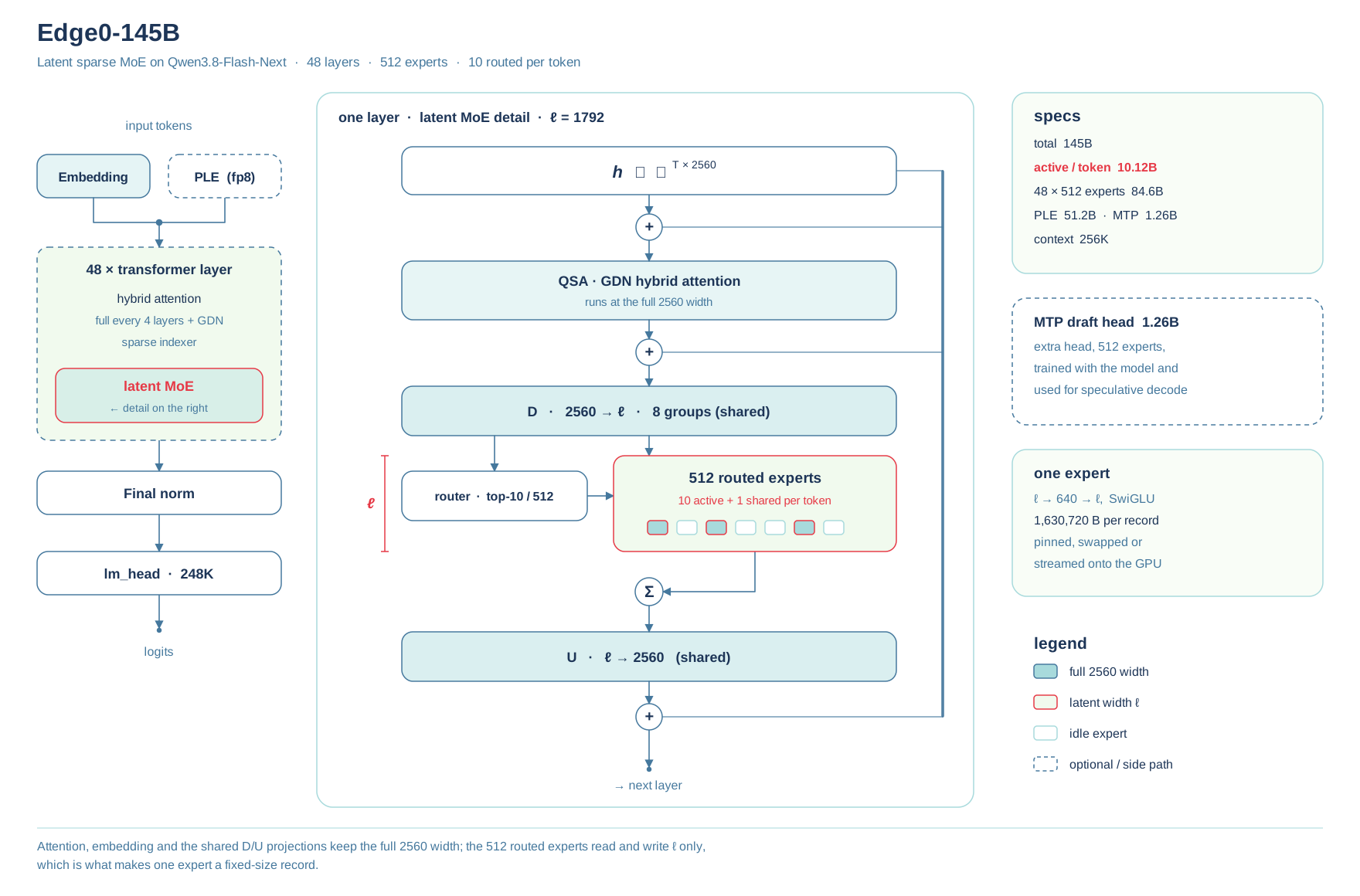
Total parameters 145B · 10.12 B active per token
Layers 48 · hybrid attention, full every 4 layers + sparse indexer
Experts 512 per layer, 10 routed + 1 shared active per token, SwiGLU width 640
Expert pool 84.6 B parameters at latent width ℓ = 1792
PLE 51.2 B n-gram embedding table, fp8, memory-mapped
MTP head 1.26 B draft model, 512 experts, for speculative decode
Context 256K · KV int8 with 32K resident
Builds Q3_K 40.81 GiB · NVFP4 47.79 GiB
Left: the stack the model actually runs — token embedding, 48 hybrid-attention layers, final norm, lm_head. Right: one layer opened up. Attention reads and writes the full 2560 width. D then projects the token down to ℓ per routing group, the router picks 10 of 512 experts, each expert runs ℓ → 640 → ℓ, a shared expert runs alongside, and U projects the combined result back to 2560.
Everything outside the expert pool stays at 2560: D and U are shared, one copy per layer. Only the 512 experts work at ℓ. That is why an expert is a fixed 1,630,720 B record — the engine keeps a few thousand of them on the card and streams the rest from host memory, at a cost that tracks how many experts are resident and not how big the model is.
Rebuilt, not converted
Edge0 is not a relabelled Qwen3.8-Flash-Next, and not a re-quantization of it: we rebuilt the model's expert layer. In all 48 layers the routed MoE experts were replaced by a latent MoE — the token is projected down to a narrow latent width (ℓ = 1792 on the 145B, 1280 on the 120B), the experts run there, and the result is projected back to 2560. One expert is now a fixed 1.63 MB (145B) or 1.16 MB (120B) record instead of a full-width block. The architecture itself changed, so the model was post-trained afterwards on a long schedule over our own data; it is trained natively at 4 bits, not quantized after the fact.
That is what matters for a device. On-device inference runs out of memory capacity and memory bandwidth long before it runs out of compute, and the expert bytes a token pushes through set both decode speed and how much memory a machine needs:
| Qwen3.8-Flash-Next | Edge0-145B | Edge0-120B | |
|---|---|---|---|
| Routed expert parameters | 120.8 B | 84.6 B (−30%) | 60.4 B (−50%) |
| Expert parameters per token | 2.36 B | 1.65 B | 1.18 B |
| Expert pool on disk · NVFP4 builds | 63.2 GiB | 44.3 GiB | 31.6 GiB |
| Decode · 16 GiB VRAM + 20 GiB RAM | 18.5 tok/s | 36.8 tok/s | 62.4 tok/s |
On that budget, decode runs 2.0× Qwen's on the 145B and 3.4× on the 120B. Quality holds through the rebuild: the 145B is ahead on the agentic benchmarks — deepswe 1.1 64.6 vs 58.7, terminal-bench 2.1 86.5 vs 83.3 — and level elsewhere.
Quick start
Each model folder (Q3_K or NVFP4, Edge0-145B or Edge0-120B) runs on Edge0 through edge0-infer, from the command line or from the Edge0 Chat desktop app. Keep the folder as it is: edge0-infer identifies the model by model_name in its model.json.
Platform & documentation notes
The build instructions cover NVIDIA GPUs with CUDA 13 on Linux or Windows (x64 or ARM64), and Metal on Apple Silicon macOS for the Q3_K build; the NVFP4 build is CUDA-only.
Build & command-line instructions
- Build. Clone the repository, then build two parts:
git clone https://github.com/Edge0-AI/Edge0.git edge0
edge0-strata, the engine: follow "Build (Linux, NVIDIA)" or "Build (Windows, NVIDIA)" in edge0-strata/EDGE0.md. edge0-infer: follow "Build" (Linux) or "Windows" in edge0-infer/docs/getting-started.md.
- Run from the command line. Pass one model folder, such as Edge0-145B-NVFP4, not the folder that holds several of them. On Windows the program is build\windows\bin\edge0-infer.exe.
build/cpu/bin/edge0-infer serve --model /path/to/Edge0-145B-NVFP4
It prints Listening: http://127.0.0.1:8000 model=<name> once the weights are loaded, where <name> is edge0_145b, and then serves OpenAI- and Anthropic-compatible endpoints:
curl localhost:8000/v1/chat/completions -H 'content-type: application/json' -d '{"model":"edge0_145b","messages":[{"role":"user","content":"hi"}],"max_tokens":64}'
edge0-infer chat --model /path/to/Edge0-145B-NVFP4 opens an interactive session instead. More options: edge0-infer/docs/edge0-145b.md.
Desktop app · Windows
⬇️ Download: GitHub Releases
Open Edge0 Chat on Windows and choose a model folder, such as Edge0-145B-NVFP4, to run the model locally. To build the app from source, follow the Edge0 Chat guide.
Images · the vision encoder in this folder
mmproj-BF16.gguf is the vision encoder: it turns a picture into the embedding rows the language model reads, and the language model itself is unchanged. Reading pictures also needs a small helper program, strata-vision. That program is not in this repository and the Edge0 source tree does not build it, so it comes from one of these two places:
The prebuilt engine archive. setup.py and strata launch download one and unpack strata and strata-vision side by side, so an install that ran with --vision already has the helper next to the engine. Building it. Take a Strata source checkout (the tools/vision project lives there, not in Edge0) and run cmake --build build-vision --target strata-vision, then put the result next to strata.
Then two entries in model.json, next to args:
"exe": "/path/to/strata", "vision": { "exe": "/path/to/strata-vision", "mmproj": "./mmproj-BF16.gguf", "model": "./model-skeleton.gguf", "gpu": false, "max_tokens": 1024 }
"model" is the text backbone this folder already uses. "gpu": false runs the encoder on the CPU and takes no VRAM. true runs it on the card and keeps about 1.4 GB free for it, so the expert cache gets that much less. "max_tokens" caps how many tokens one picture becomes. More keeps more detail and takes longer.
Add --vision to "args" as well. The server adds it by itself when the config has a vision section and prints a line saying so; writing it keeps the two in step. Without the helper beside the engine, a request that carries a picture fails with this server was started without the vision encoder.
The log says images on once the encoder is up. Then send a picture: /image /path/to.png followed by the question in the terminal chat, or an image_url part over the OpenAI API. That part takes a data: URL, an http(s) URL or a local file path.
curl localhost:8000/v1/chat/completions -H 'content-type: application/json' -d '{ "model": "edge0_145b", "messages": [{"role": "user", "content": [ {"type": "text", "text": "What does this picture show?"}, {"type": "image_url", "image_url": {"url": "data:image/png;base64,<base64>"}} ]}], "max_tokens": 256 }'
Add "reasoning_effort": "none" to get the answer without a thinking pass first; otherwise the reply can come back empty with the token budget spent on the reasoning.
Usage & troubleshooting
145B / 120B · Memory options
Low RAM · SSD offload
SSD mode: --mmap-experts — read uncached experts from SSD on demand. Low-memory arguments:
--resident-budget-gib 20 --expert-profile expert-profile.bin
Up to 20 GiB of host RAM for the expert cache; uncached experts are read from SSD on demand. Includes --mmap-experts and disjoint GPU/RAM caches automatically. The budget caps the expert cache only — not total process RAM — and is lowered further to fit available memory; the 20 GiB total-RAM test budget is a separate measurement condition.
Required: a static expert profile. Replace expert-profile.bin with your profile path.
GPU / RAM · avoid duplicate experts
Enable: --resident-experts or --resident-budget-gib N, with a static --expert-profile. Effect: experts cached in VRAM need no duplicate RAM copy. Compatible with SSD loading. Default: off, prioritizing speed. Automatically enabled: --mmap-experts, --resident-cpu-experts, --resident-pin.
12 GiB VRAM + 20 GiB RAM · running on a small card
If your machine only has a 12 GiB VRAM card and 20 GiB of system RAM, run the Q3_K build with the Q8 dense table and these settings in the pack's model.json — the configuration behind the 12 GiB row above. Flags go in args:
--vram-reserve-mib 700 --expert-cache auto --mmap-experts --resident-budget-gib 20 --expert-profile expert-profile.bin --conversation-cache-mib 0 --ple-io direct --kv int8 --kv-resident 20480 --max-context 32768 --prefill 512 --spec 4 --suffix-draft 3 --pool-workers 24 --pcie-mode dma --pcie-frac 0.1
Environment variables in env:
STRATA_LATENT_DENSE=./latent_dense_q8.bin STRATA_LATENT_DENSE_FMT=8 STRATA_LATENT_A=./experts.bin STRATA_LATENT_LABELS=./labels.bin STRATA_EMBED_VRAM=1 STRATA_LATENT_FUSED=1 STRATA_LATENT_FUSED_DU=1 STRATA_LATENT_U_GPU=1 STRATA_LAT_FUSED_Q3K=1
VRAM reserve: --vram-reserve-mib is the VRAM you leave free for the desktop and driver, so the number depends on your card's total. On a 12 GiB card use --vram-reserve-mib 700; the engine sizes its caches from the remaining ≈11.3 GiB. (The speed row was measured by giving the engine a full 12 GiB budget on a 24 GiB card via --vram-reserve-mib 12288; a physical 12 GiB card leaves a little less for the engine, so the numbers are close approximations.) RAM: --resident-budget-gib 20 caps the host-RAM expert cache; the engine clamps it to what is actually free (≈14 GiB when 20 GiB is total) and streams the remaining experts from SSD. --conversation-cache-mib 0 and --ple-io direct keep the conversation cache and the PLE table out of RAM. A static --expert-profile is required. No MTP head: leave out --mtp; --spec 4 --suffix-draft 3 drafts from repeated context instead, saving ≈0.8 GiB VRAM. Prefill 512: keep --prefill 512. Chunks below 1024 let the idle CPU pool share the expert reads from SSD; at --prefill 1024 a small card misses this and prefill runs 4–5× slower.
Measured with this configuration (Q3_K, Q8 dense, 12 GiB engine VRAM budget, 20 GiB RAM): 145B chat 22.4 / agent 23.5 tok/s, 4K 221 / 16K 222 tok/s; 120B chat 35.3 / agent 43.5 tok/s, 4K 679 / 16K 734 tok/s.
Capacity controls · VRAM and host RAM
All of these live in the pack's model.json, not on a command line: flags go in args, environment
variables in env, with paths relative to the pack directory. That is the same file the Edge0 Chat app
and edge0-infer read, so a change there applies to every launch.
"args": ["--expert-cache", "auto", "--kv-resident", "32768", "--vram-reserve-mib", "1024"],
"env":  {"STRATA_LATENT_DENSE": "./latent_dense_q8.bin", "STRATA_LATENT_DENSE_FMT": "8",
         "STRATA_LAT_FUSED_Q3K": "0"}
VRAM
| Flag | Meaning | Default |
|---|---|---|
--vram-reserve-mib N |
VRAM left free for the desktop, the driver and other processes; the engine sizes its caches from what remains. It means "leave this much free", not "give the engine this much", so the same number means different things on cards with different totals. Accepted but not listed by --help. |
700 |
--expert-cache N|auto |
Expert slots kept in VRAM. auto derives the count from the free VRAM after the fixed footprint (skeleton projections ≈ 2.9 GiB, MTP draft ≈ 0.8 GiB, verify and draft-head buffers ≈ 0.45 GiB, plus the D/U device buffers). |
0 (none) |
--expert-cache-device1..3 N|auto |
Use the second and third GPU as further expert-cache tiers. | off |
--kv-resident N |
Keep N KV cells per QSA layer in VRAM and stream the K/V from pinned host RAM, which frees VRAM for experts. | 0 (all in VRAM) |
--mtp-q4 all|proj|head |
4-bit copies of the draft layer's projections and/or head, about 0.3–0.5 GiB less VRAM. | off |
--prefill CHUNK |
Prompt chunk size; bigger chunks need bigger device buffers. auto uses the largest chunk whose buffers the expert cache can lend. |
auto |
--spec N |
The MTP drafter's verify window: how many tokens it proposes per check. A bigger window needs bigger verify buffers (about 180 MiB at 4) and pays off when every window has a fixed per-layer cost. The shipped packs use 4; the macOS setup picks 2, or 3 when the experts stream from SSD. Without an MTP layer there is no speculation. |
4 |
Host RAM
| Flag | Meaning | Default |
|---|---|---|
--memory-limit-mib N |
The RAM this engine's container or cgroup may use, for when the container cannot see its own limit. | 0 (detect) |
--resident-budget-gib N |
Cap on the host-RAM expert cache. It holds only the experts the VRAM cache does not hold, so the two sets are disjoint, and the value is clamped to the RAM actually available minus headroom. Requires a static --expert-profile. |
0 (off) |
--resident-experts |
The same with the whole complement as the budget. | off |
--mmap-experts |
Read experts through the pack file on demand instead of pinning them, so nothing is resident in RAM. | off |
--conversation-cache-mib N |
Conversation cache. 0 turns it off. |
adaptive |
--ple-io direct|mmap|ram |
The PLE table on its SSD: direct reads it unbuffered and it never enters memory; ram locks the whole table in RAM. |
direct |
--kv-resident N |
The streamed K/V lives in pinned host RAM (1.55 GiB at 32768 cells). | — |
Community builds
Third-party conversions of this model. They are not made or endorsed by Edge0; this model's licence and the upstream terms still apply to them.
- infosave/Edge0-145B-cmf — a single-file CMF build for cortiq (Rust, CUDA and Vulkan, OpenAI-compatible). The routed experts are this NVFP4 build's weights copied bit for bit; the D/U projections and the shared expert are re-encoded to 8 bits and the router to 16. The author reports it running from 12 GB cards.
Acknowledgements
Credits & license
We thank the teams behind Qwen3.8-Flash-Next and Strata for sharing their work with the community. Edge0 extends the Strata engine with latent MoE support.
Model license. Edge0-specific contributions are provided under the Edge0 Community Model License 1.0, only to the extent that Edge0 owns or is authorized to license them. Qwen materials remain subject to the Qwen Community License 1.0. Both sets of applicable terms must be followed; see NOTICE and the release scope.
The Edge0 license permits personal use, research, modification, noncommercial sharing, internal use, and commercial use of generated outputs, subject to applicable upstream conditions. Selling or commercially bundling the model, operating a commercial model service, or offering an independent commercial coding or office assistant using it requires a separate written Edge0 license. See LICENSE for the precise scope and exceptions.
Commercial licensing: info@edge0.ai. Edge0 permission does not waive Qwen's separate authorization or attribution requirements. Framework code retains its Apache-2.0 license; Strata retains its MIT license. Existing valid grants are not revoked.
Derived on Nov 19, 2026 from Hugging Face at revision 8bbf9768, README.md .
46 files, 114 GB. Every download is checked against its address.